Audio plugins for electronic music producers. Drum & bass, techno, ambient, noise. We make tools that show you what's happening in your mix — precisely, without decoration.
Right now, one plugin. Built because we needed it and couldn't find it elsewhere. More coming.
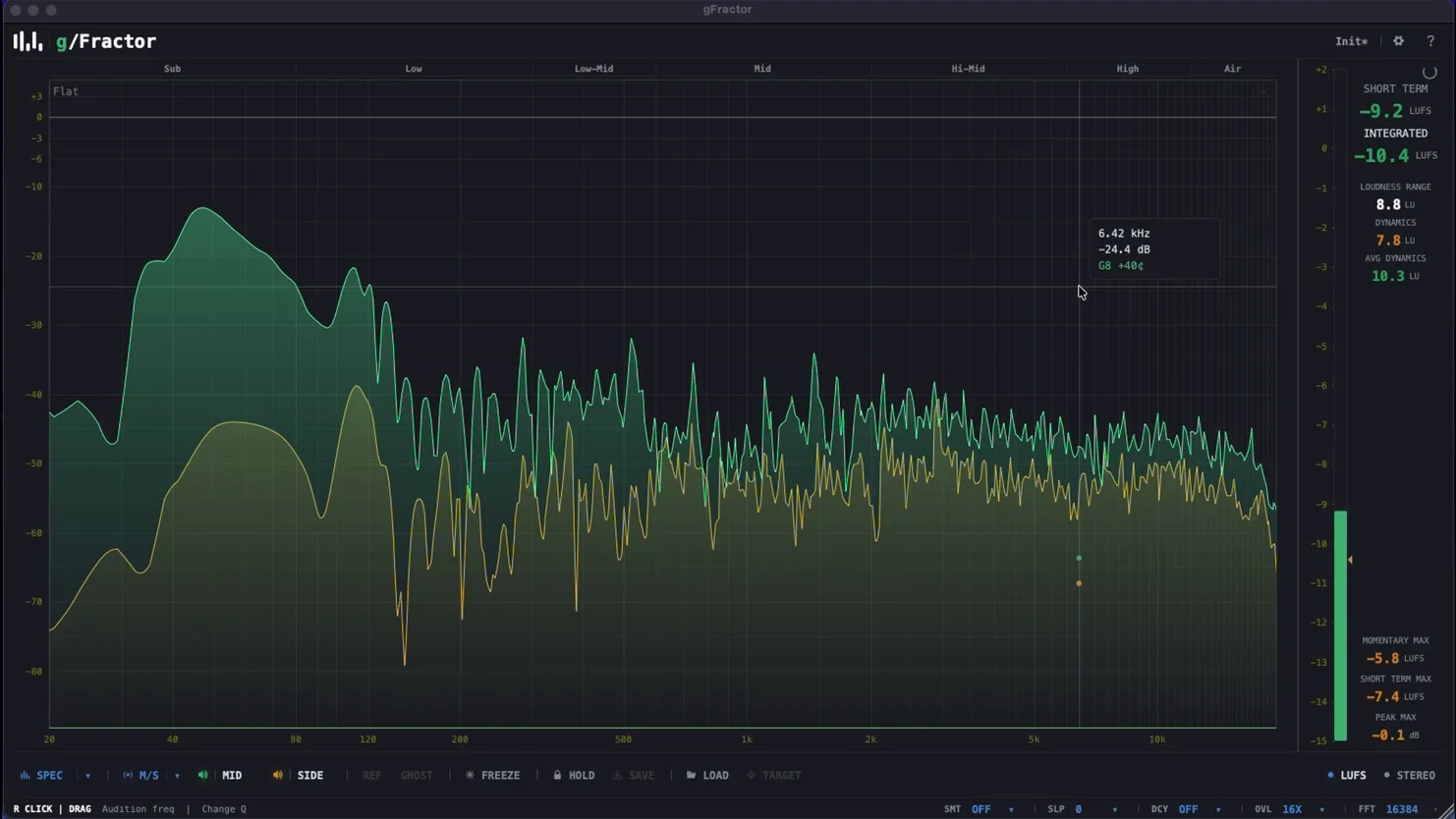
Spectrum analyzer that does what the name implies — fractures the audio into its parts. M/S analysis, reference comparison, frequency audition. One window.
In development
Next plugin
Something else is being built. When it's ready, it'll be here.
Multipurpose spectrum analyzer
The Mid is your kick, your bass, your lead. The Side is your width. gFractor shows you both simultaneously, at every frequency. Phase problems, stereo spread issues, mono compatibility — they're visible before the mastering engineer finds them.
Load a reference track — a finished Metalheadz release, a Fabric recording, last month's rough. Ghost mode overlays it on your spectrum in real time. The gap between what you have and what you're targeting is no longer something you're approximating by ear.
Click 63 Hz. Hear your sub in isolation. Right-click and drag to widen the bandwidth. Narrow to a surgical point. This is the part where you stop guessing which frequency is the problem and just listen to it directly — inside the analyzer, no extra steps.
Freeze the spectrum at the exact moment the kick peaks. That frame stays locked while the audio keeps running. Move your EQ. Confirm the fix. Unfreeze. Hold pins peak values indefinitely — useful when you need to come back to a reference position.
The cursor tooltip shows frequency in Hz, amplitude in dB, and the nearest musical note with cents deviation. 9.79 kHz is D#9 at −28¢. If you produce music, reading frequencies as notes is faster than reading them as numbers.
512 to 8192 FFT size. Configure slope (SLP), decay rate (DCY), and overlap (OVL) independently. The display behaves the way you set it up — not the way the developer assumed you'd want it.
Cursor readout
Frequency in Hz · Amplitude in dB · Note name with cents offset. Always visible on hover.
View modes
M/S · Mid · Side · Stereo — one click, spectrum updates without stopping playback.
Band labels
Sub · Low · Low-Mid · Mid · Hi-Mid · High · Air — persistent markers across the full range.
Your monitors, your room treatment, your ears after six hours — they're all coloring what you hear. Drop gFractor on the master bus. See the kick against the sub. The 300 Hz buildup. The 12 kHz shelf loss. What it actually looks like.
It's 3am. You've been in this mix for four hours. Load the reference you've been chasing. Ghost it. The difference is visual now. The low-end comparison stops being a feeling and becomes a fact.
Click the frequency. Hear it. Freeze the moment before the change. Apply the EQ move. Confirm the fix. Unfreeze. No switching windows, no context loss.
Format & Platform
Analysis Engine
Download, install, open your DAW. It works.
Download gFractor